I’m sure it’s my settings but I’m trying to do similar and when I compare my scan from mini 2 to a scan I bought mine are garbage. Can this be improved by settings or did I buy the wrong scanner?
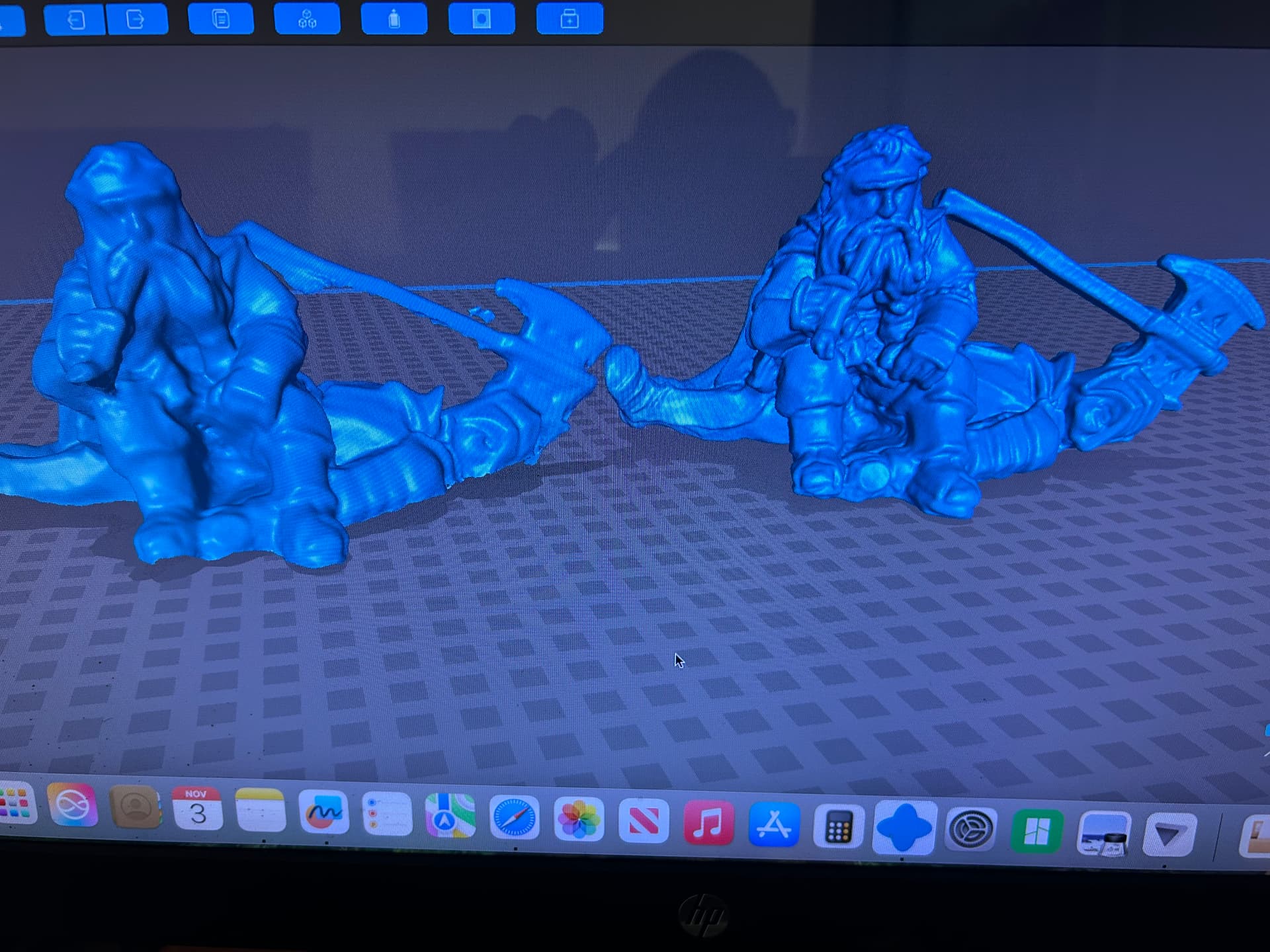
Without knowing the size of the object or your methodology, it’s hard to diagnose your problem.
This is a 28mm miniature. Sorry I’m a noob and left out details. I painted in matte white primer.
20x20x40mm
All settings were auto.
Okay there’s some good news and bad news. Bad news is that you’re not going to get the resolution of the one on the right. It looks like it’s been maybe done with a handheld dental scanner. If you want outright resolution at that scale, that’s the scanner to go for - but it’ll set you back about $4K+.
The good news is, you can probably wring a little more detail than you’ve managed, although it’s not a bad go for a noob, mate. If you’re sprayed white maybe back off the intensity one click (you’ll have to be in Manual exposure for it) and maybe try Single shot Mode?
Only the top two scans of mine were 28mm minis at a similar scale.
I appreciate the information. I’ll tinker with it and try to dial it in. This may not be the scammer for me. Maybe the technology just isn’t there yet for replicating such a small item in high detail.
The tech is here - you just have to pay 5x-10x more for it  Unless you have the budget, the MINI2 is about as good as you will get for the budget.
Your only other option is a cheap, raspberry PI-based macro photogrammetry solution, but that will require much more tinkering.
I don’t mind paying up but I wasn’t ready for 5-10x increase to get the top quality. I would guess that in a few years the high end quality will be more affordable thinking about how crap printers were 5 years ago va today l. I’ll make due with the mini2 and just know that smaller minis will not be very good. Plenty of other larger th in nga I can scan with good results. Tanks, dreads, monsters.
I guess @Guyblin refers to openscan-mini.
1 Like
I will be investigating the open scan
What resolution did you fuse points at? Walk us through your settings and maybe we might be able to help you by suggesting some tweaks to them.
Also, it’s possible that the primer might have masked some of the detail already.
1 Like
Hi @Sluggo
I did received a mini benchy from Thomas ,( Open Scan ) but so far I tested it only with MeytroY Pro and not yet with Mini 2
However both scanners do have the same accuracy , anyway I will post result later today with Mini 2

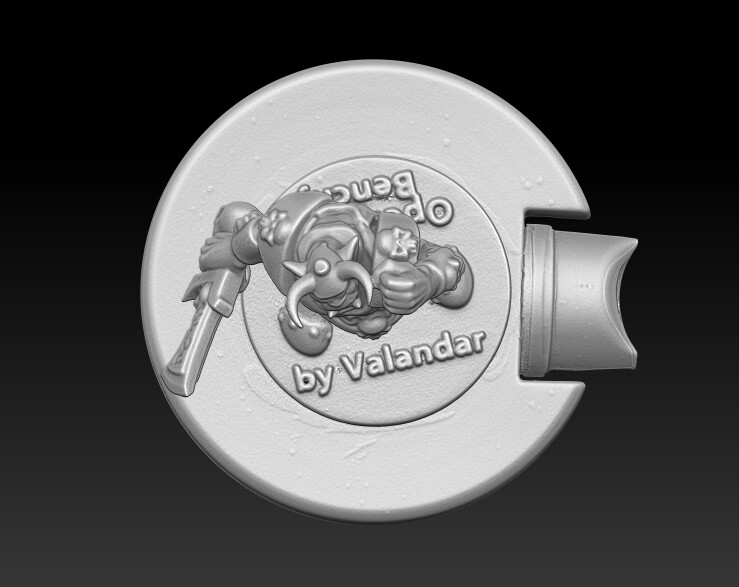


The Mini Benchy is on a 3D spray cap for reference of the size .
I used single shot mode /Auto mode for the mini benchy
Here also others scans that are very small scanned by me with Mini 2 , so definitely you can get better results than you showed in your first post .


Just remember that 3D scanner is not a microscope that allow you to scan small objects and rescale it with endless details . 3D scanned object will be only in its proper accuracy and details when printed at the same volume it was scanned with the same accuracy as the scanner .
1 Like
Great, thanks for posting. I look forward to the results.
1 Like
Everything auto , this one I scanned more time. Mets took 5 minutes instead of 1. One click mesh then filled holes. This one is better.


I’m typing this away from my computer so apologies if it’s a bit vague in places!
To improve the detail, open the project and this time don’t use the 1 Click button. Instead, click Fusion and set the resolution to 0.1mm. Run that and you’ll get a new, hopefully more detailed, point cloud. There might be a button to improve the point cloud which you can also click for further optimisation
Then click Isolation. Accept the defaults and click apply. Then run Overlap. Accept and apply default settings.
Trim the point cloud of any further unwanted points.
Then click Mesh and make sure that it’s set to 0.1mm - the same point distance that you fused at.
There’s a great video on YouTube by Artisans of Vaul which teaches Revo Scan really well, and it covers the settings I mentioned. It’s definitely worth a watch and should be easy to find.
When you’ve reprocessed your models I’d love to see the results here. I’m sure you can squeeze more details out without re-scanning.
Good luck!
When using Mini 2 , you need to set fusion at the highest level possible , 0.1 mm will be good for a coffee mug or object with less details but for a Minis you need the best fusion settings . Then after use that settings under GRID when meshing to get perfect scan .
So your workflow is great  just higher settings needed for this case .
1 Like
I had a discussion with Revopoint support, after receiving a mini from a customer. It appears that 3dscanner, at this price, are not made for such details. The best here is photogrammetry.
Openscan (mini or classic - with dslror arduino cam) is a good solution.
I can say that a Nikon D850 with a Micro Nikkor 105mm lens and chose your poison software will get you every detail on that and then some that you did not know were there!. The worst part I have lenses that go further and the setup will cost just about as much as any scanner from revo, my lenses alone cost as much as most “pro” scanning setup, hell i have a ring flash that can shout back at the sun that cost as much as my trackit
From my experience, for a mini figure that size with a Mini 2, you should end up with a trimmed point cloud with around 800K - 1 million points and a mesh with around 2 million polygons. Depending on the details in the figure.
These things all together helped improve the scans from the original. After 50+ scans on various items I have come To the conclusion that this is just not the solution for the resolution I am looking for. It’s a great machine and on larger items (size is relative when talking about miniatures large may be 200mm while small is 25mm) but since the majority of the items I am interested in digitizing are on the 25mm side I think I will search for a different solution.
Hi @Sluggo
That is the best I got with Mini 2 vs metroY Pro what use slightly different scanning mode under Auto than Full Field in Mini 2 so the details are slightly sharper , it captured actually everything there that was to capture.
With slightly 3D edit it could be improved to maximum satisfaction .


Anything better on the market will cost you at least $21 K since for your needs you need to get to 0.01mm accuracy , but still don’t expect the edges to be looking as a CAD model , unless you try micro photogrammetry, but still hand 3D edit is always needed afterwards to polish it to perfection .
1 Like