Hi Revopoint Community.
I’m writing because I’d like to share with you something strange I encountered whose cause I don’t understand, but that I think is important to report.
I recently purchased a fantastic Miraco. Coming from a Pop 2, it’s a definitely significant generational leap both in terms of the device and the software. I have even more desire than before to scan things and digitize them.
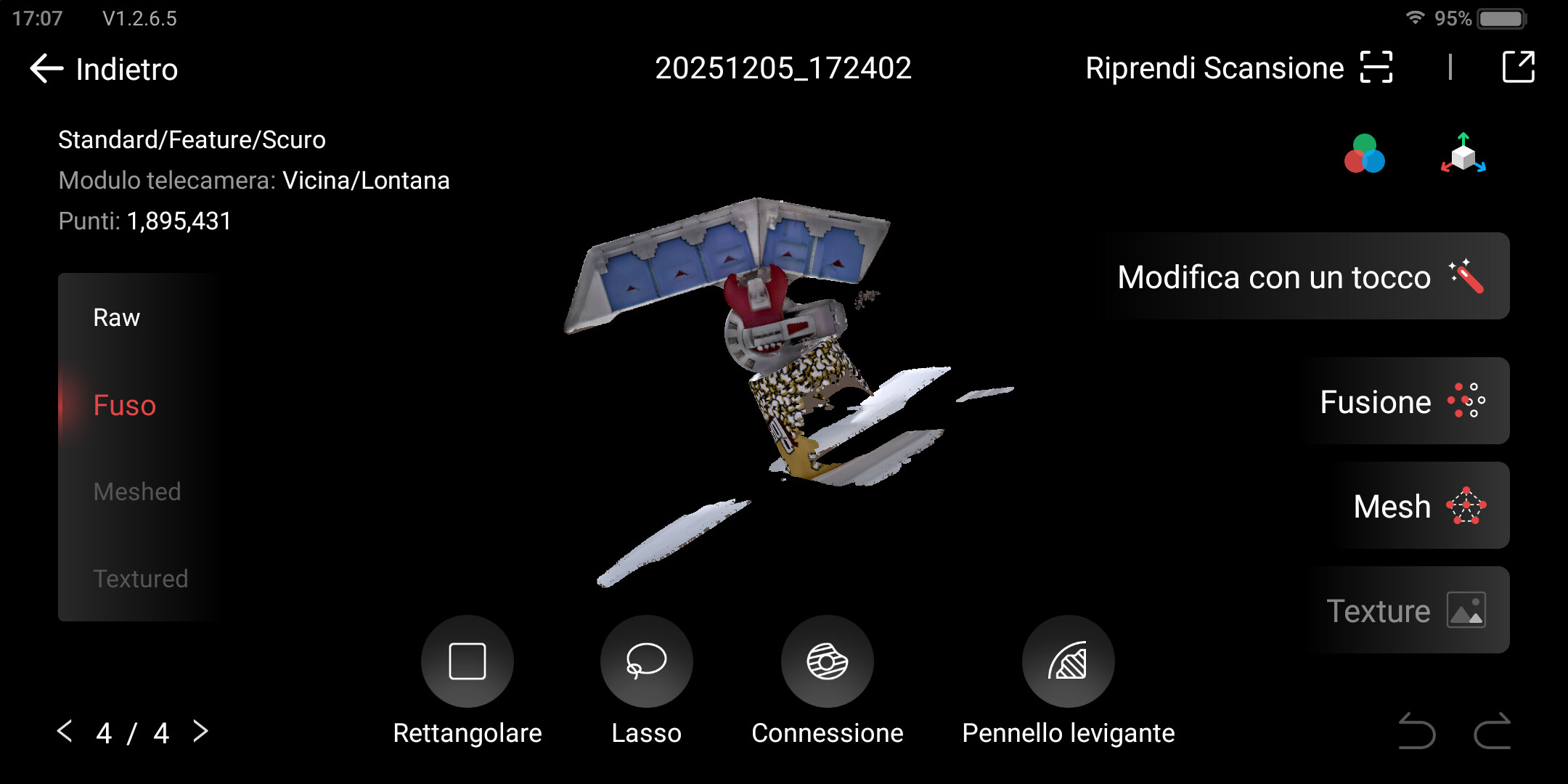
In my latest scanning attempt, however, I encountered a problem and a discrepancy between the Miraco software (version 1.2.6.5) and the Windows desktop app Revo Scan (version 5.5.4).
I’m attaching some screenshots to show the differences, but essentially the problem is as follows:
With the same data and raw point cloud, the fusion of the raw points occurs differently between Miraco and the Desktop software.
On Desktop, artifacts are generated that do not appear on Miraco.
From the screenshots as well, you can see that it’s the same project: number 20251205_172402 in both cases. These are the Fusion Parameters:
Fusion Method: ADVANCED
Point Distance (mm): Minimum possible value (0.53 on Miraco, 0.34 on RevoScan on PC)
I transferred the files from Miraco to PC via Wi-Fi and initially thought that this transfer method might have caused file corruption leading to the artifacts. So I tried transferring the project via USB (using the cable in the package) but the problem didn’t disappear: the artifacts appeared again.
The only thing that comes to mind, therefore, is that the Desktop software (version 5.5.4) and the one inside the Miraco (version 1.2.6.5) work differently. So to avoid defects or issues, I had to generate the point cloud fusion on Miraco and not on PC.
I hope this post can be useful to the developers to improve the already good PC version. I’m available to provide further details about the scan if this can be helpful for gathering information about it.
The clean look is before the fusion. The crazy nonsense is post fusion. Not a new user. Have had dozens of similar scans. All the scans I did today are all reacting the same
Hi! Thank you for your feedback.
This issue may arise because the MIRACO software and Revo Scan on your PC utilize different algorithm versions or graphics rendering mechanisms when processing models. As a result, there can be slight variations in the fusion effect, even when the same parameters are used. MIRACO is an all-in-one device designed specifically for scanning, allowing for more stable system resource allocation and image rendering. In contrast, the computer version may be affected by limitations such as graphics card drivers and CPU performance, which can lead to artifacts during the display process. These “artifacts” may appear as visual errors — for example, differences in lighting, shadows, or color mapping — and do not necessarily indicate a problem with the actual quality of the model.
To improve your experience, consider using the latest version of Revo Scan, v5.5.5.
I will update my RevoScan dekstop app to the latest version and I will try again with the same project.
Anyway, I kindly suggest you to find a way to align the algorithm between Miraco and Desktop Software (preferring the Miraco one). I suggest it because the standard workflow doesn’t implie that I will fuse the Point Cloud in Miraco.
My PC is far more powerful and faster than the Miraco and I prefer to save time fusing the project on my PC than the Miraco. But if I encounter this kind of issues than I don’t have alternatives: I need to stay in the Miraco for the fusing and than transfer it.
You can’t have the same algorithms on PC as on MIRACO because MIRACO has simplified results and much lower quality after processing than PC , the reason you see so much additional stuff you don’t see on MIRACO what has a slower system and can’t handle as much data as CPU
If you want less data just use higher Fusing settings and don’t try to get all too highest settings to avoid extra noise and data .
Especially if you scan humans you can freely use the fusing at 0.1 to 0.2 then after cleaning the overlapped points and lose points mesh it at the same GRID level as the fusing so 0.1 or 0.2 for best results .
The clean look is just a virtual preview of the data folder, it is not even a point cloud but simplified and unorganized cells , fusing takes the best frames that matching the scans and what left is the junk data that need to be cleaned , how higher the fusing settings how more frames will produce junk data , so clean it up using lose points and overlapped points after before meshing , or use higher fusing settings .
Remember the fusing settings on MIRACO do not correspondence with the settings on the PC .
And that is not nonsense , that is completely normal behavior .