# Nickluvin's MetroX Showcase
**URL:** https://forum.revopoint3d.com/t/nickluvins-metrox-showcase/31416
**Category:** Showcases
**Tags:** metrox, reverse-engineering, quicksurface
**Created:** [December 30, 2024, 6:16am UTC](https://forum.revopoint3d.com/t/nickluvins-metrox-showcase/31416 "2024-12-30T06:16:26Z")
**Posts on this page:** 14
**Page:** 1
### Author:  [@Nickluvin](https://forum.revopoint3d.com/u/Nickluvin)
#### Post date: [December 30, 2024, 6:16am UTC](https://forum.revopoint3d.com/t/nickluvins-metrox-showcase/31416/1 "2024-12-30T06:16:26Z")
Hey!
Starting my showcase of MetroX scans. A lot of people have just received their scanners and there will be a lot of these popping up. I also want to use this to highlight issues I’ve seen with some of the modes pop up.
One project I was waiting for this scanner to show up for is an axle I want to build for my truck. Axle was free to me since it was pulled off a truck that was in an accident. I knew that the axle was bent, but I wanted to do a scan to see how bent it is.
First goal is to scan the axle.

Feature tracking in Full Field mold with black object setting. It did pretty well. I had to take a lot of frames out of this scan though where it had troubles with some features and started scanning and offsetting. I wish there was an easy way to “mark” when you see this to make it easier to go back in and find the key frames to delete. Tracking was ok, it seems much better on my Miraco. I’ll get into a comparison I did between the two and tracking on another part.
It did pretty well picking up casting text and even the chipping paint off the tube on the right side.
Fused

Meshed

All of scans merged into one. I played with using a combination of full field with markers as well as crossed. One thing I noticed is that the software would seem to stall out. I would move the laser back to an area that was marker rich and it would instantly jump to that spot. It seems like you need a _ **LOT** _ of markers for the crossed and parallel laser to work well.
As I said before this axle was in an accident. The diff nailed a boulder and caused some damage. You can see in the scan and using QuickSurface just how low that area is in comparison to the rest of the diff cover surface

Before scanning I 3d printed some caps and pulled a string tight in the center of the outside of the axle. Measuring on the inside of the diff with another 3d printed piece I made I can see that it says the axle is 3/8-1/2" out of alignment at the diff.

I wanted to confirm that I could get a similar number with the scanner. I built pretty much the same setup in cad where I created a cylinder on each end of the axle and created a line in between. I then created a sketch on the inner bearing race area and measured between that center point and my line going from end to end. The result was 0.4522" just under half an inch which my string measurement gave. It was also off in the same direction as expected.

Next steps are to determine where exactly the bend is in the axle. The scan was oriented so that the diff cover surface was aligned with the front axis. This becomes our zero plane. Drawing a straight line along the axle housing, I can see that the housing is straight and does not have a curve to it. I can measure the angle at which the whole axle is cocked relative to the surface. I can see that it is 2.15deg.

This also tells me that to fix this issue I am going to have to move the axle housing where it enters the cast diff housing.
**#MyMetroXScan**
---
### Author:  [@24c](https://forum.revopoint3d.com/u/24c)
#### Post date: [January 15, 2025, 9:39am UTC](https://forum.revopoint3d.com/t/nickluvins-metrox-showcase/31416/2 "2025-01-15T09:39:55Z")
Hi Nick,
Did you use QuickSurface or QuickSurface Lite
I’m curious to know how much use QuickSurface Lite is, as QuickSurface licensing is a bit hot for my use case at the moment.
Mike
---
### Author:  [@Revopoint-Jane](https://forum.revopoint3d.com/u/Revopoint-Jane)
#### Post date: [January 15, 2025, 9:55am UTC](https://forum.revopoint3d.com/t/nickluvins-metrox-showcase/31416/3 "2025-01-15T09:55:06Z")
Great scanning and application, thank you for sharing your MetroX scan!
---
### Author:  [@Nickluvin](https://forum.revopoint3d.com/u/Nickluvin)
#### Post date: [January 15, 2025, 11:49am UTC](https://forum.revopoint3d.com/t/nickluvins-metrox-showcase/31416/4 "2025-01-15T11:49:09Z")
The pictures you see in this one are actually from Solidworks with the Xtract3d plugin. Similar but a little different from Quicksurface. It is much more reasonably priced at $180 usd for 3 month license.
Quicksurface pro has a lot of functionality, most of what I don’t know how to use. I have years of Solidworks experience so it is more comfortable for me to work in that environment vs quicksurface. I actually haven’t played with QS lite so I cant comment on the differences. I think it lacks some of the surfacing capabilities in lite.
---
### Author:  [@Nickluvin](https://forum.revopoint3d.com/u/Nickluvin)
#### Post date: [March 22, 2025, 12:48am UTC](https://forum.revopoint3d.com/t/nickluvins-metrox-showcase/31416/5 "2025-03-22T00:48:57Z")
Project of the day. I have this mtn bike hub that I need to take apart. There is a lock ring on the inside, but I needed a way to hold the hub so I could crank on the lock ring.
Scanned using auto turn table with a bit of scanning spray because its black and shiny.
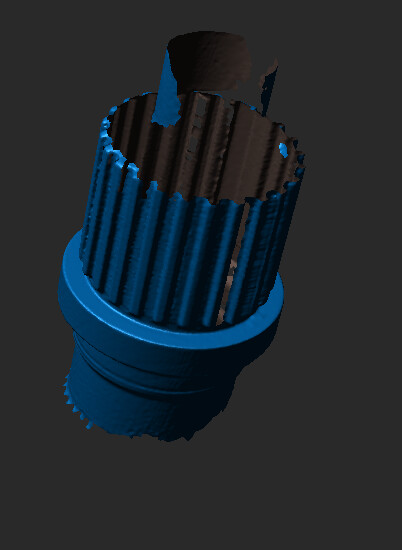
Brought it into solidworks and used Xtract3D to pull a sketch

extruded it out


Worked like a charm to hold the hub in the vice and allow me to get the lock ring off.
---
### Author:  [@ivan](https://forum.revopoint3d.com/u/ivan)
#### Post date: [March 22, 2025, 7:20am UTC](https://forum.revopoint3d.com/t/nickluvins-metrox-showcase/31416/6 "2025-03-22T07:20:50Z")
Nice work! Did you 3d print it or was it cnc machined out of metal?
---
### Author:  [@Nickluvin](https://forum.revopoint3d.com/u/Nickluvin)
#### Post date: [March 24, 2025, 3:19pm UTC](https://forum.revopoint3d.com/t/nickluvins-metrox-showcase/31416/7 "2025-03-24T15:19:46Z")
It was just 3d printed as a quick and dirty way to hold the part in the vice while I got the lockring off.
---
### Author:  [@Nickluvin](https://forum.revopoint3d.com/u/Nickluvin)
#### Post date: [April 1, 2025, 10:25pm UTC](https://forum.revopoint3d.com/t/nickluvins-metrox-showcase/31416/8 "2025-04-01T22:25:02Z")
**Spoke Tension Measurement Tool Handle Replacement**
Not a complex one, but I had broken the handle on my bicycle spoke tension measurement tool. The other side was intact still, so I took it off and scanned it. Did a few scans using parallel lines on the turn table

Reverse engineered in SW using Xtract3d


Then printed and installed

---
### Author:  [@Revopoint-Jane](https://forum.revopoint3d.com/u/Revopoint-Jane)
#### Post date: [April 2, 2025, 1:57am UTC](https://forum.revopoint3d.com/t/nickluvins-metrox-showcase/31416/9 "2025-04-02T01:57:45Z")
Simple but useful! 👏
---
### Author:  [@Nickluvin](https://forum.revopoint3d.com/u/Nickluvin)
#### Post date: [October 6, 2025, 11:56pm UTC](https://forum.revopoint3d.com/t/nickluvins-metrox-showcase/31416/10 "2025-10-06T23:56:39Z")
Did some experimenting with the new Revo Metro Software. Scanning was really nice with it. It picks up markers waaaaay better than before. Feels more like using the Miraco now. I did notice that there is no number to pick in the meshing option. Probably to make it easier for people and just mesh based on your fusion settings you picked. Overall Software was running fast and had zero issues. I’ll give global markers a try as I know some previous versions stuggled with that. Scanner is finally working how I would have expected it too, only took us a year to get there 😉
RevoMetroX software:

RevoMetro software:

I did that the new software has some issues picking up around the markers. It kept giving this square box around them where it wouldn’t pick up in the preview. But in the raw data it was fine. Not sure whats up with that.

---
### Author:  [@PUTV](https://forum.revopoint3d.com/u/PUTV)
#### Post date: [October 7, 2025, 12:55am UTC](https://forum.revopoint3d.com/t/nickluvins-metrox-showcase/31416/11 "2025-10-07T00:55:23Z")
Hi @Nickluvin I did not used MetroX with Revo Metro as I only used MetroY and MetroY Pro without at this moment .
Thanks for the note about the markers , I will check it with MetroX and confirm with the Dev team after the holidays.
---
### Author:  [@Nickluvin](https://forum.revopoint3d.com/u/Nickluvin)
#### Post date: [January 1, 2026, 8:00pm UTC](https://forum.revopoint3d.com/t/nickluvins-metrox-showcase/31416/12 "2026-01-01T20:00:04Z")
Been working on turning an old truck into more of a offroad vehicle. Part of this build is installing some custom switches on the inside. I have a overhead console that has an area that is not being used and has a plastic cover that fills the void. My plan is to use this area to hold a wireless aux switch board.

Scans were done using the turntable in auto mode and merged together. Then brought into solidworks using Xtract3d. I’ve been playing with Geomagic Design X, but just keep going back to Xtract3D. Probably because I am more comfortable in the Solidworks workspace.

Green piece was redesigned to hold the Brown switch piece.

Part was 3d printed and installed


---
### Author:  [@PUTV](https://forum.revopoint3d.com/u/PUTV)
#### Post date: [January 1, 2026, 8:04pm UTC](https://forum.revopoint3d.com/t/nickluvins-metrox-showcase/31416/13 "2026-01-01T20:04:48Z")
Hi Nick
Thanks for sharing ! Nice one
---
### Author:  [@Revopoint](https://forum.revopoint3d.com/u/Revopoint)
#### Post date: [January 4, 2026, 6:13am UTC](https://forum.revopoint3d.com/t/nickluvins-metrox-showcase/31416/14 "2026-01-04T06:13:48Z")
Great work Nick!!